Transform Your Webinars and Courses with 70 Page Canva Webinar Slides
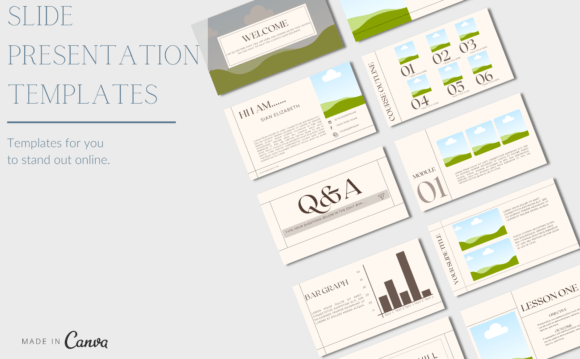
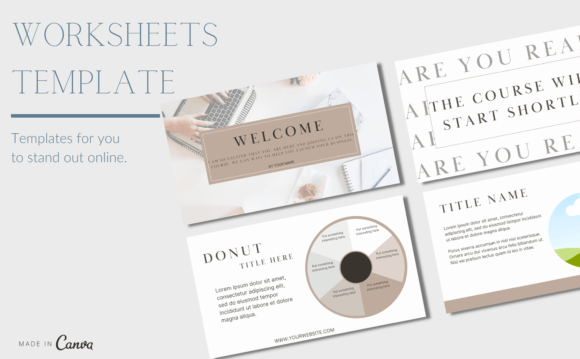
Creating engaging and professional webinars, masterclasses, and courses has never been easier. With the 70 Page Canva Webinar Slides, you can craft visually stunning presentations that captivate your audience and effectively communicate your message. This bundle is designed specifically for course creators, coaches, and educators who want to elevate their online presence and deliver impactful content.
Why Choose Canva for Your Webinar and Course Presentations?
Canva is a powerful yet user-friendly design tool that allows you to create professional-looking graphics and presentations without needing advanced design skills. The 70 Page Canva Webinar Slides template bundle takes this a step further by providing a comprehensive set of pre-designed slides that cover all aspects of your webinar or course. Here’s why it stands out:
- Fully Customizable: Tailor every element to match your brand with a free Canva account.
- Designed for Educators: Perfect for course creators, coaches, and educators who want to engage and inform their audiences.
- Versatile Use: Suitable for creating online course content, webinars, masterclasses, and workshops.
What's Included in the 70 Page Canva Webinar Slides Bundle?
The 70 Page Canva Webinar Slides bundle is packed with everything you need to create a seamless and engaging presentation. Here’s what you get:
- Welcome and Introduction Slides: Set the tone and introduce your topic and yourself.
- Audience Engagement Slides: Interactive elements to keep your audience involved and interested.
- Further Purchase Slides: Encourage additional purchases or sign-ups with well-designed call-to-action slides.
- Testimonials and Success Stories: Share real-life success stories to build trust and credibility.
- Infographics and Visuals: Make complex information easy to understand with visually appealing infographics.
- Quotes and Inspirational Messages: Add motivational and thought-provoking quotes to inspire your audience.
- Framework and Course Outlines: Clearly present your course structure and key takeaways.
- Pricing Guides: Transparently display your pricing options and value propositions.
- Call-to-Action Slides: Strong, compelling calls to action to drive conversions.
- Next Steps and Contacts: Provide clear instructions on what to do next and how to stay in touch.
- Thank You Slides: End on a positive note with a thank you message and final thoughts.
How to Use the 70 Page Canva Webinar Slides Bundle
Getting started with the 70 Page Canva Webinar Slides is simple and straightforward. Follow these steps to create your next impressive webinar or course:
- Purchase the Template: Visit the product page and complete your purchase.
- Download the Instruction PDF: Once purchased, download the included Instruction PDF for detailed guidance.
- Access the Template: Click on the link provided in the PDF to access the Canva template.
- Customize and Create: Use the "Use this template" feature to start customizing your slides. You can reuse the template as many times as needed for different presentations.
Practical Benefits of Using 70 Page Canva Webinar Slides
The 70 Page Canva Webinar Slides offer numerous practical benefits that can significantly enhance your webinar and course creation process:
- Time-Saving: Pre-designed templates save you hours of design work, allowing you to focus on content creation.
- Professional Appearance: High-quality, professionally designed slides make your presentations look polished and credible.
- Consistent Branding: Easily customize the templates to match your brand colors, fonts, and style, ensuring a consistent and professional look.
- Engagement Tools: Interactive and engaging elements keep your audience attentive and involved throughout the presentation.
- Flexibility: The versatile templates can be used for various types of presentations, from webinars to full-length courses.
Real-World Scenarios and Examples
Let’s explore some real-world scenarios where the 70 Page Canva Webinar Slides can make a significant impact:
- Educational Webinars: A teacher using the template to create an engaging webinar on a specific subject, incorporating interactive quizzes and polls to keep students engaged.
- Business Workshops: A business coach using the template to design a workshop on leadership skills, including case studies, testimonials, and actionable tips.
- Online Courses: An e-learning platform using the template to develop a series of video lessons, complete with course outlines, infographics, and call-to-action slides for additional resources.
Common Considerations Before Choosing 70 Page Canva Webinar Slides
Before you decide to use the 70 Page Canva Webinar Slides, here are some factors to consider:
- Design Needs: Assess whether the pre-designed templates align with your brand and design preferences.
- Content Requirements: Ensure the templates cover all the necessary sections and elements for your specific presentation needs.
- Budget: Consider the cost of the template and whether it fits within your budget for creating high-quality presentations.
- Technical Skills: While Canva is user-friendly, having basic design skills will help you make the most of the templates.
Final Thoughts
The 70 Page Canva Webinar Slides offer a comprehensive and versatile solution for creating engaging and professional webinars, masterclasses, and courses. With its fully customizable templates, you can tailor each slide to perfectly match your brand and message. Whether you’re a seasoned educator or just starting out, this bundle provides the tools you need to create impactful and visually appealing presentations. Start transforming your webinars and courses today with the 70 Page Canva Webinar Slides.